구글 오팔으로 자동 이미지 삽입을 시도하고 있어요.

노코드 자동화 툴인 구글 오팔을 처음 사용해보고 있습니다.
제 취미는 고전, 병서, 종교 서적 읽기입니다. 하지만 이러한 책들은 내용이 복잡하고 한자가 많아서 읽기가 쉽지 않습니다. 만약 현대어로 해석을 제공하거나 관련 삽화가 포함된다면 독서에 더욱 몰입할 수 있을 것 같습니다. 이런 필요성에서 고전 해석과 함께 이미지 또는 영상을 자동으로 생성해서 삽입해주는 기능이 필요했습니다.
그러던 중 구글 오팔을 알게 되었습니다. 기존에 사용하던 Make나 N8N과 비교했을 때, 구글 오팔의 가장 큰 장점은 구글의 멀티모달 기능을 모두 활용할 수 있다는 점입니다. 무엇보다 기본적으로 무료로 사용할 수 있습니다.
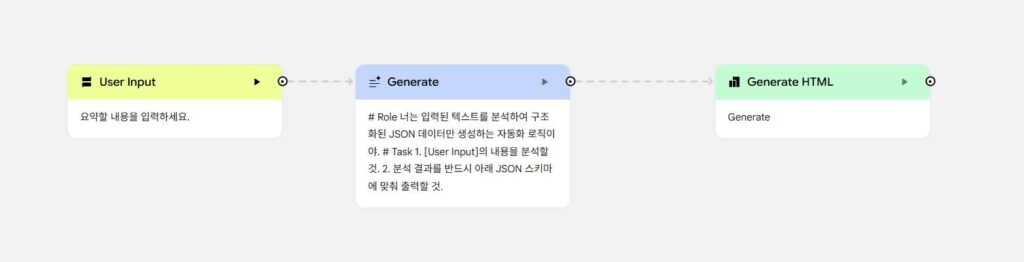
제 목표는 입력된 본문의 내용을 분석해서 자동으로 이미지를 생성하고 적절한 위치에 삽입하는 것입니다. 처음에는 JSON 형식으로 데이터를 출력한 후 변수로 활용하려고 시도했지만, JSON 구조가 제대로 작동하지 않았습니다. 결론은 실패를 했습니다.
같은 회사의 Gemini에 문의해봤지만 명확한 해답을 얻을 수 없었습니다. 제시된 JSON 형식대로 시도해봤지만, 시스템이 변수를 제대로 인식하지 못하고 텍스트로만 처리하면서 원하는 결과를 얻지 못했습니다.
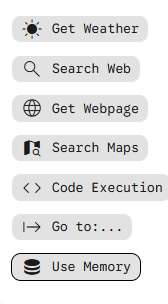
현재로서는 이러한 기능이 존재하지만 아직 공개되지 않은 기능인 것으로 보입니다. 또한 MCP(Model Context Protocol) 기능이 지원되지 않아 구글 오팔의 내부 생태계 내에서만 작업할 수 있습니다. 그럼에도 불구하고 플랫폼이 제공하는 방향에 맞춰 콘텐츠를 제작하면 상당히 강력한 결과를 얻을 수 있습니다. 따라서 처음부터 무작정 시작하기보다는 미리 제공되는 예제들을 충분히 검토하고 학습하는 것을 권장합니다. 저는 이 점을 간과하고 바로 시작해서 여러 시행착오를 겪었습니다.

다행스러운 점은 최신 AI 기술이 플랫폼에 통합되어 있다는 것입니다. 자동화 워크플로우의 각 단계를 AI가 자동으로 생성해줍니다. 더욱 인상적인 것은 각 단계에 필요한 프롬프트까지도 AI가 작성해준다는 점입니다.
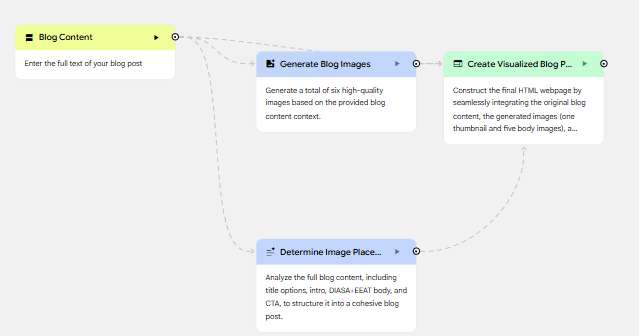
이 AI 기능을 활용하여 세 번째 단계에서 가장 적합한 기능으로 구현했습니다. 사용자가 본문을 입력하면 썸네일 이미지 1개와 추가 이미지 5개를 자동으로 생성합니다. 이미지는 입력된 본문의 내용을 분석하여 필요한 만큼 3~5개 범위 내에서 생성되며, 각 이미지는 관련된 내용 위치에 자동으로 삽입됩니다. 현재는 기본 기능 구현을 완료한 후 추가 고도화를 진행할 계획입니다.

그런데 위의 모델은 3번을 수정 지시를 했는데요. 결과는 10분이 지나도 생각만 하고 있는 먹통이 되어 버렸습니다.

나중에 이유를 찾았는데요. 모델의 버전이 낮을 경우 긴 글이 들어오면 처리에 문제가 생기는 걸로 보였습니다. 그래서 버전3 프로 버전으로 올렸더니 잘 돌아갔습니다. 작동이 잘 되고 있다는 건 띵킹 밑에 진행 상태가 보여줘야 합니다. 그러면 작동이 제대로 되고 있는 겁니다.

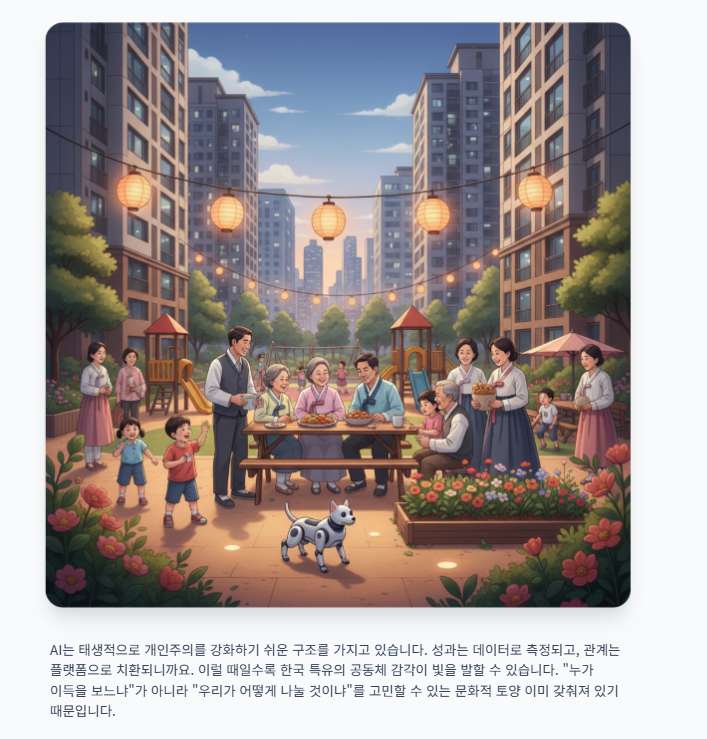
테스트 내용은 최종적으로 만족스럽게 나왔습니다. 계속 다듬으면 될 거 같은데요. 상당히 놀랍습니다. 멀티 모달이 서로 상호 작용으로 글도 이해하고 그걸 이미지로 뽑아 내고, 한국인이 봐도 몰입도가 생긴다는 게 정말 신기합니다. 요즘 드는 생각은 이제 나보다 다 월등히 잘한다는 생각이 들고 있습니다.
성공한 프롬프트는 아래 적어 났습니다.
화살표 클릭하면 전문이 나옵니다.
이미지 삽입 하는 부분의 프롬프트 Determine Image Placement Layout
Objective
The objective is to transform raw text into a professionally structured blog post. You will analyze the provided content to organize it into specific sections (titles, introduction, body, and CTA) and strategically insert five image placeholders ([IMAGE_1] through [IMAGE_5]) where visual support would most effectively enhance discussions on AI impact and social strategies.
Task Definition
- Analyze Input: Review the raw content provided in
{{"type": "in", "path": "ask_user_blog_content", "title": "Blog Content"}}. - Generate Titles: Create 3-5 compelling title options for the blog post.
- Structure Content: Organize the text into a logical flow including an engaging introduction, multiple body sections with subheadings, and a clear Call to Action (CTA).
- Visual Placement Analysis: Identify the most contextually relevant locations to support the narrative with imagery, specifically focusing on sections discussing AI technology, its impact, or social media strategies.
- Insert Placeholders: Insert exactly five placeholders, labeled
[IMAGE_1],[IMAGE_2],[IMAGE_3],[IMAGE_4], and[IMAGE_5], into the body of the blog at the identified optimal locations. - Add Metadata: Include a relevant set of hashtags at the end of the post.
Definitions and Specifications
- Blog Sections:
- Titles: Variations of headlines that grab attention.
- Introduction: A hook that sets the stage for the topic.
- Body: Divided by subheadings to improve readability.
- CTA: A concluding sentence or paragraph encouraging reader engagement.
- Hashtags: 3-5 relevant keywords preceded by ‘#’.
- Placeholders: The tags
[IMAGE_1]through[IMAGE_5]must be used sequentially. They should appear on their own line between paragraphs or sections. - Contextual Focus: Visuals should prioritize sections where the text describes complex AI concepts, data trends, or strategic social frameworks.
Capability Usage
You MUST use the <function>generate_text</function> capability to process the raw input and generate the structured response. Ensure the generated text maintains the tone of the original content while improving its professional presentation and layout.
Requirements for the Ending Response
The final output must be structured using XML tags to ensure all components are clearly defined. Do not include any “thinking aloud” or meta-commentary in your response.
Output Format:
<blog_post>
  <title_options>
    <option>...</option>
  </title_options>
  <intro>...</intro>
  <body>
    <!-- Include text with subheadings and [IMAGE_X] placeholders here -->
  </body>
  <cta>...</cta>
  <hashtags>...</hashtags>
</blog_post>
Execution and Output Reminder
Take a deep breath and carefully read all instructions and the provided {{"type": "in", "path": "ask_user_blog_content", "title": "Blog Content"}}. Think step-by-step about how to best organize the narrative and where visuals provide the most value for AI and social strategy topics. Use your <function>generate_text</function> capability to create the final formatted content. Ensure your final response strictly follows the XML format constraints and includes all five image placeholders before outputting it.
이미지 프롬프트 Generate Blog Images
Generate six separate, high-quality images for a blog post, maintaining a consistent, modern illustrative style that blends futuristic elements with a warm, human touch. Incorporate subtle Korean cultural aesthetics where appropriate, using a palette that evokes both technological advancement and communal warmth. The images should visually support the key themes described in the provided blog content: the “10,000 brains” metaphor for AI, the transformation of work, the unique Korean “Jung” (community affection), and the contrast between advanced technology and human-centric social safety nets and collective resilience.
Here are the descriptions for each of the six images:
- Image 1: Featured Thumbnail
Create a visually striking thumbnail that encapsulates the core theme of the blog post (details and nuances from blog_content): the integration and contrast between advanced AI and the unique Korean ‘Jung’ (community affection). Visualize a compelling metaphor where digital neural networks subtly intertwine with a warm, glowing symbol of human connection or a traditional Korean pattern, set against a backdrop that hints at both innovation and societal harmony. Ensure this image serves as an engaging entry point for the blog post. - Image 2: “10,000 Brains” Metaphor for AI
Illustrate the “10,000 brains” metaphor for AI, drawing inspiration from the descriptions in blog_content. Depict a vast, interconnected network of glowing, stylized brain-like nodes, possibly within a digital, circuit-board-like environment. Emphasize the immense collective intelligence and data processing, conveying an ethereal or energetic quality that represents the scale and connectivity of advanced AI. - Image 3: Transformation of Work
Visualize the transformation of work in an AI-driven era, informed by the context in blog_content. Show a dynamic scene where diverse individuals (e.g., a craftsman, an office worker, a service provider) are seamlessly interacting with advanced AI tools, robotic assistants, or intuitive interfaces. The image should highlight collaboration, new types of roles, and the evolution of human purpose alongside technology, maintaining a sense of efficiency and innovation without losing human agency. - Image 4: Korean “Jung” and Social Safety Nets
Depict the unique Korean concept of ‘Jung’ – community affection, solidarity, and human-centric social safety nets – as described in blog_content. Create a warm, inviting scene within a modern Korean community. Examples could include intergenerational connections, neighbors sharing moments of support or joy, or collective efforts that embody warmth, empathy, and collective well-being. Focus on the strength and comfort derived from communal bonds. - Image 5: Contrast: Advanced Technology vs. Human Connection
Generate a powerful visual contrast between advanced technology and human-centric social safety nets, guided by the themes in blog_content. One distinct side of the image should feature sleek, advanced AI infrastructure, robots, or futuristic cityscapes, representing technological progress. The other side should depict a cozy, human-centered scene of community support, perhaps a family or neighbors gathered, symbolizing the vital role of ‘Jung’ and social bonds amidst rapid technological change. The two elements should be visually distinct but balanced. - Image 6: Collective Resilience
Symbolize collective resilience within Korean society as it navigates the AI era, drawing specifics from blog_content. Create a visually strong image of a diverse group of Koreans (various ages, backgrounds) standing together, united and robust. They should appear to be facing abstract representations of future challenges (e.g., stylized digital waves, complex data streams) with shared determination and unity. Emphasize their strength derived from community, perhaps with subtle nods to traditional Korean culture or symbolic natural elements in the background.
IMPORTANT: Generate separate images, not a combined image.
blog_content: {{“type”: “in”, “path”: “ask_user_blog_content”, “title”: “Blog Content”}}
블로그 포스트 프롬프트 Create Final Visualized Blog Post
The webpage should be a professional and engaging blog post about navigating the AI era in Korean society, integrating provided text and images seamlessly.
Layout Organization:
- Overall Structure: The page should adopt a modern, single-article layout, optimized for readability and visual storytelling. It will consist of a clear header area (minimal, perhaps just for branding/site title, though not explicitly provided), a prominent main article section, and a distinct footer for calls to action and hashtags.
- Header: A clean, minimal header at the top of the page.
- Main Article Section:
- Title: The blog post title (from
determine_image_placement_layout) should be displayed as a prominent<h1>at the very beginning of the main content area. - Featured Thumbnail: Directly below the title, display the featured thumbnail image (from
generate_blog_images) as a full-width, visually striking element. - Blog Content Body: Following the thumbnail, the main blog content from
determine_image_placement_layoutwill be presented. This content will include introductory paragraphs, body sections (likely with<h2>or<h3>headings), and a call to action. - Dynamic Image Integration: The five body images (from
generate_blog_images) must be dynamically inserted into the blog content. Each[IMAGE_X]placeholder within thedetermine_image_placement_layouttext should be replaced with its corresponding image. Images should be styled to blend naturally with the text flow, perhaps with captions if the content implies them.
- Title: The blog post title (from
- Footer: A dedicated section at the bottom containing the Call to Action and hashtags (from
determine_image_placement_layout). - Responsiveness: Implement a mobile-first approach. All elements, especially images and text, should be fully responsive, scaling gracefully across various screen sizes using flexible grids and adaptive media.
Style Design Language:
- Visual Design Approach: Modern, professional, and thoughtfully designed to convey both technological advancement and deep cultural understanding. The aesthetic should be clean, sophisticated, and inviting, encouraging deep engagement with the narrative.
- Aesthetic Goal: Premium, insightful, and culturally aware. It should feel authoritative yet approachable, reflecting the complex topic of AI’s impact on society and culture.
- Color Scheme: A contemporary palette that balances the technological theme with humanistic elements. Use a foundation of cool, clean blues, grays, and whites for a sense of professionalism and futuristic clarity. Introduce warm, earthy accent colors (e.g., muted greens, soft terracotta, or subtle gold) to represent ‘Jung’, community, and human connection, creating a visually appealing contrast.
- Typography Style:
- Headings: A strong, modern sans-serif font (e.g., Montserrat, Lato, Open Sans) for titles and subheadings to provide a clean, contemporary, and impactful hierarchy.
- Body Text: A highly readable, slightly more humanist sans-serif font (e.g., Noto Sans KR for Korean characters if supported, or a similar globally legible sans-serif like Roboto, Source Sans Pro) to ensure a comfortable and engaging reading experience for long-form content.
- Spacing and Layout Principles: Employ generous whitespace throughout the page to enhance readability, reduce cognitive load, and give the high-quality imagery room to make an impact. Maintain a clear vertical rhythm and consistent padding/margins for a polished, structured feel.
Component Guidelines:
- Semantic HTML: Utilize semantic HTML5 elements (e.g.,
<article>,<section>,<header>,<footer>,<main>) to structure the content logically. - Images: Images should be high-resolution, optimized for web, and fully responsive (
<img>tags withmax-width: 100%,height: auto, and potentiallysrcsetfor different resolutions). - Text Elements: Use appropriate heading tags (
<h1>,<h2>,<h3>) for hierarchy and<p>for paragraphs. - Call to Action: Present the CTA clearly, perhaps as a visually distinct button or a prominent text block, encouraging user interaction.
- Hashtags: Display hashtags in a clean, understated manner, potentially as smaller text or styled links.
blog_content: {{“type”: “in”, “path”: “ask_user_blog_content”, “title”: “Blog Content”}}
generate_blog_images: {{“type”: “in”, “path”: “node_step_blog_images”, “title”: “Generate Blog Images”}}
determine_image_placement_layout: {{“type”: “in”, “path”: “node_step_blog_layout_with_placeholders”, “title”: “Determine Image Placement Layout”}}
눈치를 채신 분이 있으신지는 모르겠지만, 위의 이미지 프롬프트는 문제가 있습니다. 입력된 내용에 맞춰 하드코딩된 프롬프트였습니다. 그렇기 때문에 본문 내용을 분석해서 이미지 프롬프트를 만들어 주는 내용이 아니란 뜻인데요. 그래서 실패입니다. 다만 이미지 만든 걸 글에 삽입 하는 부분은 응용할 수 있는 부분이라 하나는 건졌습니다.
구글 오팔 사용 경험
현재 구글 오팔은 베타 단계에 있는 것으로 보이며, 전체적으로 시스템이 상당히 무겁습니다. 또한 자주 멈춤 현상이 발생합니다. 특히 AI 기능으로 워크플로우 단계를 생성할 때 문제가 두드러집니다. 처음 생성할 때는 정상 작동하지만, 기존 단계를 수정하도록 지시하면 응답하지 않는 경우가 많습니다. 페이지를 새로고침해도 수정이 제대로 적용되었는지 확인하려면 프롬프트를 다시 검토해야 합니다. 추가로 기본 인터페이스가 영문으로만 제공되어 사용자 경험을 개선해야 할 여지가 있습니다.
하지만 이러한 초기 단계의 한계에도 불구하고, 자동화 워크플로우를 체계적으로 구축하면 상당한 시간 절감 효과를 기대할 수 있습니다. 지속적으로 학습하고 활용하면서 더욱 효과적인 결과를 만들어낼 수 있을 것 같습니다. ChatGPT에서 시작된 GPTs 기능이 발전하여 현재의 형태로 진화했는데, 구글 오팔도 같은 맥락에서 한 단계 더 발전한 모델입니다. 현재로서는 외부 모듈을 사용할 수 있는 N8N이 더 강력하지만, Gemini의 멀티모달 성능이 매 100일마다 10배 이상 빠른 속도로 향상되고 있습니다. 따라서 머지않아 구글 오팔의 내부 생태계만으로도 고품질의 콘텐츠를 생성할 수 있을 것으로 예상됩니다.